WPF
- Windows Presentation Foundation의 약자
- 마이크로소프트에서 만든 UI 프레임워크
- .NET으로 빌드가 가능
MVVM 패턴
model : 데이터를 다루는 부분, 비즈니스 로직을 포함
View : 레이아웃과 화면을 보여주는 역할, 사용자 인터페이스 담당
ViewModel
- View에서 발생하는 이벤트 감지하고, 해당 이벤트에 맞는 비즈니스 로직을 수행
- Model과 상호작용하여 데이터를 가져오거나 업데이터
- View에 데이터를 업데이터하는 역할
- View에 표시할 데이터를 가공하여 제공
MVVM패턴 동작과정
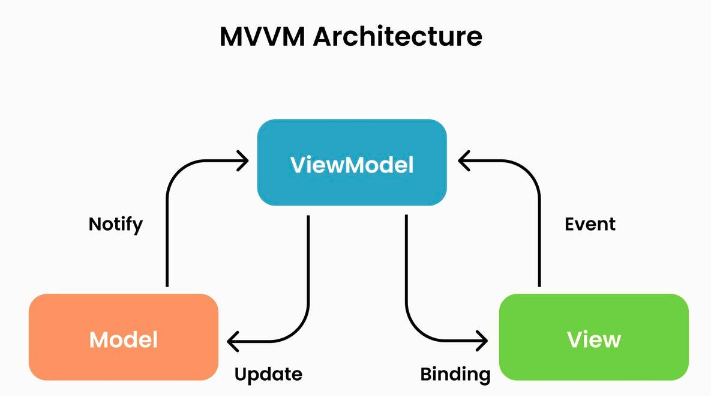
- 사용자의 Action이 View를 통해 들어온다.
- View에 Action이 들어오면 ViewModel에 Action을 전달
- ViewModel은 Model에게 데이터를 요청
- Model이 ViewModel에게 데이터를 전달
- ViewModel이 응답받은 데이터를 가공하여 저장
- View는 Data Binding을 이용해 UI를 갱신
MVVM 패턴의 장점
- 뷰 로직과 비즈니스 로직을 분리하여 생산성 증가
- 테스트 수월
- 하나의 ViewModel을 여러 View가 공유할 수 있다( 하나의 로그인 ViewModel을 모바일뷰,PC뷰,테블릿뷰가 공유할 수 있다. (코드 재사용성 용이)
MVVM 패턴의 단점
- 설계가 복잡함
- 데이터 바인딩으로 인한 메모리 소모가 심하다.
- ViewModel 설계가 복잡함
XAML
- eXtensible Markup Language
- WPF에서 View를 그리기위해 사용하는 언어
- Markup Language이기 때문에 태그를 사용
계산기 만들어보기
partial : 하나의 클래스를 여러 파일에 나눠서 작성할 수 있게 해주는 키워드
WPF 프로젝트를 보면 UI와 로직을 분리해서 관리하고 이 둘이 합쳐져서 하나의 클래스를 정의하기 때문에 partial키워드를 넣어준다.
public partial class MainWindow : Window 부분을 보면 Window클래스를 상속받는 것을 확인할 수 있다.
Window클래스는 창 하나에 필요한 모든 기본 기능을 구현해둔 클래스이고 이 클래스를 MainWindow에서 상속받기 때문에 창을 만들 때 필요한 여러 값이나 기능을 사용할 수 있게 된다.
MainWindow 클래스를 생성할때 InitializeComponent()를 통해 XAML을 읽고, Display나 Button등의 컨트롤 객체를 생성하는 등의 초기화 작업이 이루어 진다.
public MainWindow()
{
    InitializeComponent(); // XAML UI 초기화
}
값을 저장하기 위한 멤버 변수
private double _currentValue = 0; // 현재 계산 값
private string _currentOperator = ""; // 현재 연산자
private bool _isNewEntry = true; // 새 입력 여부
Number_Click메서드는 숫자 버튼을 눌렀을 때 실행되는 이벤트 로직이다.
- object sender : 이벤트를 발생시킨 객체
- 왜 object 타입일까? : 이벤트를 발생 시키는 객체가 Button, TextBox, Window등 다양할 수 있기 때문이다.
- 왜 Button button = sender as Button; 와 같이 sender를 Button타입으로 바꿔줄까? : sender가 object타입이기 때문에 버튼 클래스의 메서드나 속성에 접근하기 위해서 형변환을 해준다.
- RoutedEventArgs e : WPF 이벤트에 대한 추가 정보
private void Number_Click(object sender, RoutedEventArgs e)
{
    Button button = sender as Button;
    if (_isNewEntry) //지금 숫자 입력이 첫 숫자 입력인가?
    {
        Display.Text = button.Content.ToString(); //지금 누른 숫자를 화면에 넣음
        _isNewEntry = false;
    }
    else //숫자 입력중일때는
    {
        Display.Text += button.Content.ToString(); //새 숫자를 뒤에 붙임.
    }
}
해당 메서드는 입력된 연산자에 따라 계산결과를 화면에 출력하는 메서드이다.
private void Calculate(double newValue)
{
    switch (_currentOperator)
    {
        case "+":
            _currentValue += newValue;
            break;
        case "-":
            _currentValue -= newValue;
            break;
        case "×":
            _currentValue *= newValue;
            break;
        case "÷":
            _currentValue /= newValue;
            break;
    }
    Display.Text = _currentValue.ToString();
}
연산자 버튼을 누를때 수행되는 Operator_Click 메서드
private void Operator_Click(object sender, RoutedEventArgs e) //연산자 버튼을 누를때 수행
{
    Button button = sender as Button;
    if (double.TryParse(Display.Text, out double newValue)) //화면에 있는 값을 숫자로 변환
    {
        if (!_isNewEntry)
        {
            Calculate(newValue);
        }
        _currentOperator = button.Content.ToString(); //현재 연산자 저장

        if (_currentOperator == "%")
        {
            double percentValue = _currentValue * (newValue / 100);
            Calculate(percentValue);
            _currentOperator = "";
        }
        else
        {
            _currentValue = newValue;
        }
        _isNewEntry = true;

    }
}
= 버튼을 누를때 계산이 수행되도록 하는 메서드
 private void Result_Click(object sender, RoutedEventArgs e)
 {
     if(double.TryParse(Display.Text, out double newValue))
     {
         Calculate(newValue); //계산 수행
         _currentOperator = ""; //연산자 초기화
         _isNewEntry = true; //새로운 값을 받을 준비
     }
 }
<전체 코드>
using System;
using System.Collections.Generic;
using System.ComponentModel;
using System.Linq;
using System.Text;
using System.Threading.Tasks;
using System.Windows;
using System.Windows.Controls;
using System.Windows.Data;
using System.Windows.Documents;
using System.Windows.Input;
using System.Windows.Media;
using System.Windows.Media.Imaging;
using System.Windows.Navigation;
using System.Windows.Shapes;

namespace WpfApp1
{
    /// <summary>
    /// MainWindow.xaml에 대한 상호 작용 논리
    /// </summary>
    public partial class MainWindow : Window
    {
        private double _currentValue = 0; // 현재 계산 값
        private string _currentOperator = ""; // 현재 연산자
        private bool _isNewEntry = true; // 새 입력 여부

        public MainWindow()
        {
            InitializeComponent(); // XAML UI 초기화
        }

        private void Number_Click(object sender, RoutedEventArgs e)
        {
            Button button = sender as Button;
            if (_isNewEntry)
            {
                Display.Text = button.Content.ToString();
                _isNewEntry = false;
            }
            else
            {
                Display.Text += button.Content.ToString();
            }
        }

        private void Operator_Click(object sender, RoutedEventArgs e) //연산자 버튼을 누를때 수행
        {
            Button button = sender as Button;
            if (double.TryParse(Display.Text, out double newValue)) //화면에 있는 값을 숫자로 변환
            {
                if (!_isNewEntry)
                {
                    Calculate(newValue);
                }
                _currentOperator = button.Content.ToString(); //현재 연산자 저장

                if (_currentOperator == "%")
                {
                    double percentValue = _currentValue * (newValue / 100);
                    Calculate(percentValue);
                    _currentOperator = "";
                }
                else
                {
                    _currentValue = newValue; //지금 화면에 있는 값을 피연산 값으로 저장
                }
                _isNewEntry = true;

            }
        }


        private void Calculate(double newValue)
        {
            switch (_currentOperator)
            {
                case "+":
                    _currentValue += newValue;
                    break;
                case "-":
                    _currentValue -= newValue;
                    break;
                case "×":
                    _currentValue *= newValue;
                    break;
                case "÷":
                    _currentValue /= newValue;
                    break;
            }
            Display.Text = _currentValue.ToString();
        }


        //지우기 버튼: 초기화
        private void Clear_Click(object sender, RoutedEventArgs e)
        {
            _currentValue = 0;
            _currentOperator = "";
            Display.Text = "0";
            _isNewEntry = true;
        }

        private void Backspace_Click(object sender, RoutedEventArgs e)
        {
            if (Display.Text.Length > 1)
            {
                Display.Text = Display.Text.Substring(0, Display.Text.Length - 1); //지우기

            }
            else
            {
                Display.Text = "0"; //화면의 숫자는 0으로 설정
                _isNewEntry = true; // 값을 새롭게 받음
            }
        }

        private void Point_Click(object sender, RoutedEventArgs e)
        {
            if (_isNewEntry) //새롭게 숫자를 받아야 하는데 .을 찍으면 0.으로 표기
            {
                Display.Text = "0.";
                _isNewEntry = false;
                return;
            }

            if (!Display.Text.Contains("."))
            {
                Display.Text += ".";

            }
        }

        private void Result_Click(object sender, RoutedEventArgs e)
        {
            if(double.TryParse(Display.Text, out double newValue))
            {
                Calculate(newValue); //계산 수행
                _currentOperator = ""; //연산자 초기화
                _isNewEntry = true; //새로운 값을 받을 준비
            }
        }
    }
}
<Window x:Class="WpfApp1.MainWindow"
xmlns="http://schemas.microsoft.com/winfx/2006/xaml/presentation"
xmlns:x="http://schemas.microsoft.com/winfx/2006/xaml"
Title="Calculator"
Height="520"
Width="360"
WindowStartupLocation="CenterScreen"
ResizeMode="NoResize">
<Grid Margin="10">
<Grid.ColumnDefinitions>
<ColumnDefinition Width="99*"/>
<ColumnDefinition/>
</Grid.ColumnDefinitions>
<!-- 전체 레이아웃: 표시창 + 버튼 -->
<Grid.RowDefinitions>
<RowDefinition Height="100"/>
<RowDefinition Height="*"/>
</Grid.RowDefinitions>
<!-- ================= 표시창 ================= -->
<TextBox x:Name="Display"
Grid.Row="0"
Text="0"
FontSize="36"
IsReadOnly="True"
TextAlignment="Right"
VerticalContentAlignment="Center"
Padding="10"
Margin="0,0,0,10" Grid.ColumnSpan="2"/>
<!-- ================= 버튼 영역 ================= -->
<Grid Grid.Row="1" Grid.ColumnSpan="2">
<Grid.RowDefinitions>
<RowDefinition/>
<RowDefinition/>
<RowDefinition/>
<RowDefinition/>
<RowDefinition/>
</Grid.RowDefinitions>
<Grid.ColumnDefinitions>
<ColumnDefinition/>
<ColumnDefinition/>
<ColumnDefinition/>
<ColumnDefinition/>
</Grid.ColumnDefinitions>
<!-- 1행 -->
<Button Content="C" Grid.Row="0" Grid.Column="0" Click="Clear_Click"/>
<Button Content="CE" Grid.Row="0" Grid.Column="1" Click="Clear_Click"/>
<Button Content="⌫" Grid.Row="0" Grid.Column="2" Click="Backspace_Click"/>
<Button Content="÷" Grid.Row="0" Grid.Column="3" Click="Operator_Click"/>
<!-- 2행 -->
<Button Content="7" Grid.Row="1" Grid.Column="0" Click="Number_Click"/>
<Button Content="8" Grid.Row="1" Grid.Column="1" Click="Number_Click"/>
<Button Content="9" Grid.Row="1" Grid.Column="2" Click="Number_Click"/>
<Button Content="×" Grid.Row="1" Grid.Column="3" Click="Operator_Click"/>
<!-- 3행 -->
<Button Content="4" Grid.Row="2" Grid.Column="0" Click="Number_Click"/>
<Button Content="5" Grid.Row="2" Grid.Column="1" Click="Number_Click"/>
<Button Content="6" Grid.Row="2" Grid.Column="2" Click="Number_Click"/>
<Button Content="-" Grid.Row="2" Grid.Column="3" Click="Operator_Click"/>
<!-- 4행 -->
<Button Content="1" Grid.Row="3" Grid.Column="0" Click="Number_Click"/>
<Button Content="2" Grid.Row="3" Grid.Column="1" Click="Number_Click"/>
<Button Content="3" Grid.Row="3" Grid.Column="2" Click="Number_Click"/>
<Button Content="+" Grid.Row="3" Grid.Column="3" Click="Operator_Click"/>
<!-- 5행 -->
<Button Content="0" Grid.Row="4" Grid.Column="1" Click="Number_Click"/>
<Button Content="." Grid.Row="4" Grid.Column="2" Click="Point_Click"/>
<Button Content="=" Grid.Row="4" Grid.Column="3" Click="Result_Click"/>
</Grid>
</Grid>
</Window>